

ArchLinux系のManjaroにTeXのディストリビューションであるTeX Liveをインストールしました。
TeXエディタは使い慣れているVisual Studio Code(VSCode)を使い、VSCodeでLaTeXファイルの作成・編集、PDFファイルの確認までできる環境を整備しました。
\(\LaTeX\)(らてっく/らてふ)とは
Leslie Lamportによって開発されたテキストベースの組版処理システムです。
組版性能が高く、数式や図・グラフなどがきれいに表示されるため、大学などでは論文執筆ツールとして使われています。
LaTeXはWordなどのワープロソフトと違い、LaTeXファイルをそのまま閲覧するのではなく、コンパイルしてDVI形式やPDF形式の閲覧用ファイルを作成する必要があります。
また、LaTeXファイルそのものはテキストファイルなので、比較的簡単にプログラミング言語と連携させることができます。
環境
$ uname -r
5.10.98-1-MANJARO
$ lsb_release -a
LSB Version:    n/a
Distributor ID:    ManjaroLinux
Description:    Manjaro Linux
Release:    21.2.3
Codename:    Qonos
$
TeX Liveのインストール
インストール
pacmanを使い、公式リポジトリにあるtexlive-mostグループとtexlive-langjapaneseをインストールしました。
$ sudo pacman -S texlive-langjapanese texlive-most
:: 12 個のパッケージがグループ texlive-most に存在します:
:: リポジトリ extra
   1) texlive-bibtexextra  2) texlive-core  3) texlive-fontsextra  4) texlive-formatsextra  5) texlive-games  6) texlive-humanities
   7) texlive-latexextra  8) texlive-music  9) texlive-pictures  10) texlive-pstricks  11) texlive-publishers  12) texlive-science

選択して下さい (デフォルト=all):
警告: texlive-core-2021.61403-1 は最新です -- 再インストール
依存関係を解決しています...
衝突するパッケージがないか確認しています...

パッケージ (14) perl-file-which-1.27-1  texlive-bibtexextra-2021.61406-1  texlive-core-2021.61403-1  texlive-fontsextra-2021.61408-1
                texlive-formatsextra-2021.57972-1  texlive-games-2021.60973-1  texlive-humanities-2021.60935-1  texlive-langjapanese-2021.61273-1
                texlive-latexextra-2021.61405-1  texlive-music-2021.60382-1  texlive-pictures-2021.61392-1  texlive-pstricks-2021.61407-1
                texlive-publishers-2021.61397-1  texlive-science-2021.61383-1

合計ダウンロード容量:         683.46 MiB
合計インストール容量:        2454.45 MiB
最終的なアップグレード容量:  2063.35 MiB

:: インストールを行いますか? [Y/n] Y
:: パッケージを取得します...
 texlive-fontsextra-2021.61408-1-any                           503.2 MiB  4.76 MiB/s 01:46 [####################################################] 100%
 texlive-core-2021.61403-1-any は最新です
 texlive-langjapanese-2021.61273-1-any                          82.6 MiB  2.56 MiB/s 00:32 [####################################################] 100%
 texlive-pstricks-2021.61407-1-any                              25.5 MiB  5.23 MiB/s 00:05 [####################################################] 100%
 texlive-music-2021.60382-1-any                                 22.3 MiB  4.31 MiB/s 00:05 [####################################################] 100%
 texlive-publishers-2021.61397-1-any                            19.5 MiB  4.64 MiB/s 00:04 [####################################################] 100%
 texlive-latexextra-2021.61405-1-any                            14.1 MiB  4.65 MiB/s 00:03 [####################################################] 100%
 texlive-pictures-2021.61392-1-any                               7.9 MiB  4.57 MiB/s 00:02 [####################################################] 100%
 texlive-science-2021.61383-1-any                                3.4 MiB  4.13 MiB/s 00:01 [####################################################] 100%
 texlive-bibtexextra-2021.61406-1-any                            3.3 MiB  3.64 MiB/s 00:01 [####################################################] 100%
 texlive-formatsextra-2021.57972-1-any                         672.8 KiB  2.78 MiB/s 00:00 [####################################################] 100%
 texlive-games-2021.60973-1-any                                587.1 KiB  2.73 MiB/s 00:00 [####################################################] 100%
 texlive-humanities-2021.60935-1-any                           323.8 KiB  1002 KiB/s 00:00 [####################################################] 100%
 perl-file-which-1.27-1-any                                     12.1 KiB   242 KiB/s 00:00 [####################################################] 100%
 合計 (14/14)                                                  683.5 MiB  4.25 MiB/s 02:41 [####################################################] 100%
(14/14) キーリングのキーを確認                                                             [####################################################] 100%
(14/14) パッケージの整合性をチェック                                                       [####################################################] 100%
(14/14) パッケージファイルのロード                                                         [####################################################] 100%
(14/14) ファイルの衝突をチェック                                                           [####################################################] 100%
(14/14) 空き容量を確認                                                                     [####################################################] 100%
:: トランザクション前のフックを実行...
(1/1) Creating Timeshift snapshot before upgrade...
==> skipping timeshift-autosnap due skipRsyncAutosnap in /etc/timeshift-autosnap.conf set to TRUE.
:: パッケージの変更を処理しています...
( 1/14) 再インストール texlive-core                                                        [####################################################] 100%
>>> updmap custom entries should go into /etc/texmf/web2c/updmap-local.cfg
>>> fmtutil custom entries should go into /etc/texmf/web2c/fmtutil-local.cnf
( 2/14) インストール texlive-langjapanese                                                  [####################################################] 100%
( 3/14) インストール texlive-bibtexextra                                                   [####################################################] 100%
( 4/14) インストール texlive-fontsextra                                                    [####################################################] 100%
( 5/14) インストール texlive-formatsextra                                                  [####################################################] 100%
( 6/14) インストール texlive-games                                                         [####################################################] 100%
( 7/14) インストール perl-file-which                                                       [####################################################] 100%
( 8/14) インストール texlive-latexextra                                                    [####################################################] 100%
texlive-latexextra の提案パッケージ
    python-pygments: for pygmentex
    texlive-genericextra: to use the calctab package [インストール済み]
    texlive-pictures: to use the package overpic [保留]
    java-environment: to use pdfannotextractor
( 9/14) インストール texlive-humanities                                                    [####################################################] 100%
texlive-humanities の提案パッケージ
    texlive-pictures: for package qtree [保留]
(10/14) インストール texlive-music                                                         [####################################################] 100%
texlive-music の提案パッケージ
    python: for scripts from the lilyglyphs packages [インストール済み]
    fontforge: for scripts from the lilyglyphs packages
(11/14) インストール texlive-pictures                                                      [####################################################] 100%
(12/14) インストール texlive-pstricks                                                      [####################################################] 100%
(13/14) インストール texlive-publishers                                                    [####################################################] 100%
(14/14) インストール texlive-science                                                       [####################################################] 100%
:: トランザクション後のフックを実行...
(1/6) Arming ConditionNeedsUpdate...
(2/6) Warn about old perl modules
(3/6) Updating fontconfig cache...
(4/6) Updating TeXLive filename database...
(5/6) Updating TeXLive format files...
(6/6) Updating TeXLive font maps...
$
インストールの確認
$ pacman -Qs texlive
local/texlive-bibtexextra 2021.61406-1 (texlive-most)
    TeX Live - Additional BibTeX styles and bibliography databases
local/texlive-bin 2021.59745-1
    TeX Live binaries
local/texlive-core 2021.61403-1 (texlive-most)
    TeX Live core distribution
local/texlive-fontsextra 2021.61408-1 (texlive-most)
    TeX Live - all sorts of extra fonts
local/texlive-formatsextra 2021.57972-1 (texlive-most)
    TeX Live - collection of extra TeX 'formats'
local/texlive-games 2021.60973-1 (texlive-most)
    TeX Live - Setups for typesetting various board games, including chess
local/texlive-humanities 2021.60935-1 (texlive-most)
    TeX Live - LaTeX packages for law, linguistics, social sciences, and humanities
local/texlive-langjapanese 2021.61273-1 (texlive-lang)
    TeX Live - Fonts and macro packages to typeset Japanese texts
local/texlive-latexextra 2021.61405-1 (texlive-most)
    TeX Live - Large collection of add-on packages for LaTeX
local/texlive-music 2021.60382-1 (texlive-most)
    TeX Live - Music typesetting packages
local/texlive-pictures 2021.61392-1 (texlive-most)
    TeX Live - Packages for drawings graphics
local/texlive-pstricks 2021.61407-1 (texlive-most)
    TeX Live - Additional PSTricks packages
local/texlive-publishers 2021.61397-1 (texlive-most)
    TeX Live - LaTeX classes and packages for specific publishers
local/texlive-science 2021.61383-1 (texlive-most)
    TeX Live - Typesetting for mathematics, natural and computer sciences
$
PDFファイルの作成(動作確認)
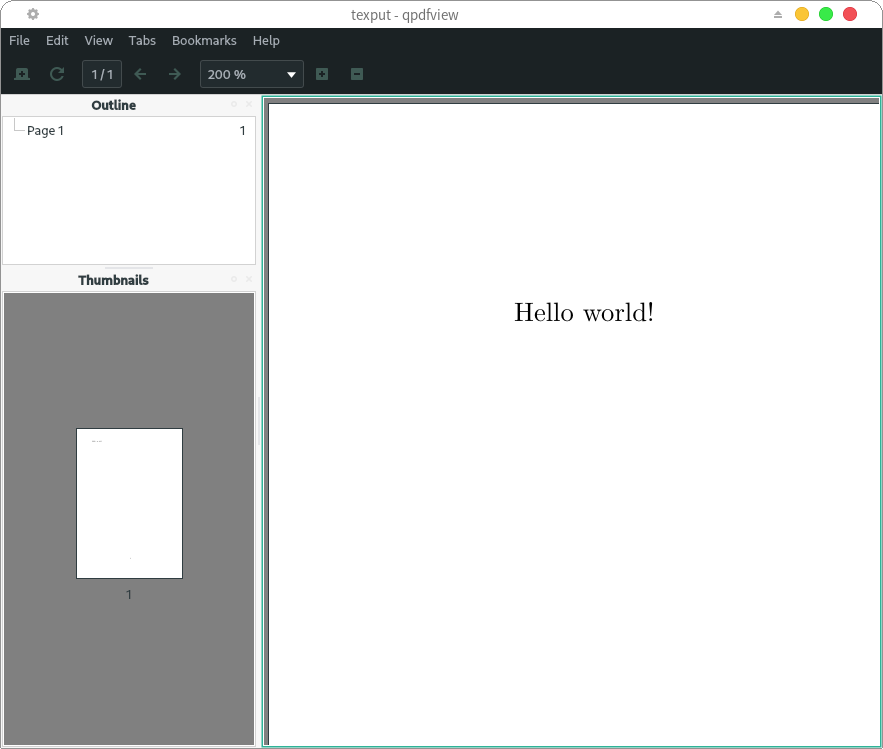
TeX Liveのインストール確認のため、「Hello world!」とだけ書かれたPDFファイルを作成します。
(ここではPDFビューアーはqpdfviewを使いました)
$ mkdir test
$ cd test
$ ls
$
$ pdftex '\empty Hello world!\bye'
This is pdfTeX, Version 3.141592653-2.6-1.40.23 (TeX Live 2021/Arch Linux) (preloaded format=pdftex)
 restricted \write18 enabled.
entering extended mode
[1{/var/lib/texmf/fonts/map/pdftex/updmap/pdftex.map}]</usr/share/texmf-dist/fo
nts/type1/public/amsfonts/cm/cmr10.pfb>
Output written on texput.pdf (1 page, 11932 bytes).
Transcript written on texput.log.
$
$ ls
texput.log  texput.pdf
$
$ qpdfview texput.pdf
$ 
Visual Studio Codeの設定
ここからはVSCodeの環境を整えていきます。
LaTeX Workshopのインストール
「機能拡張」アイコンをクリックして「latex」と入力し、「LaTeX Workshop」をインストールします。

LaTeX Workshopの設定
ここでは「LaTeX Workshop」に以下の設定をします。
- コンパイルには
uplatexを使う - コンパイル時に作成されるファイルはビルド完了後に自動削除
- PDFファイルをタブ表示にする
まず、settings.jsonを開きます。
Ctrl+Shift+Pでコマンドパレットを開き、「settings」と入力します。
「基本設定:設定(JSON)を開く」が表示されるのでクリックします。
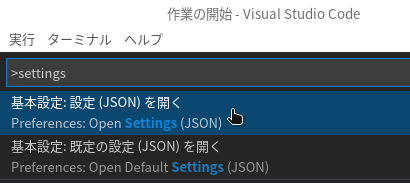
「settings.json」タブが表示されるので、「settings.jsonの変更内容」を参考にLaTeX Workshopの設定を追記してください。
「LaTeX Workshop」のインストール後、歯車アイコン(管理)をクリックします。
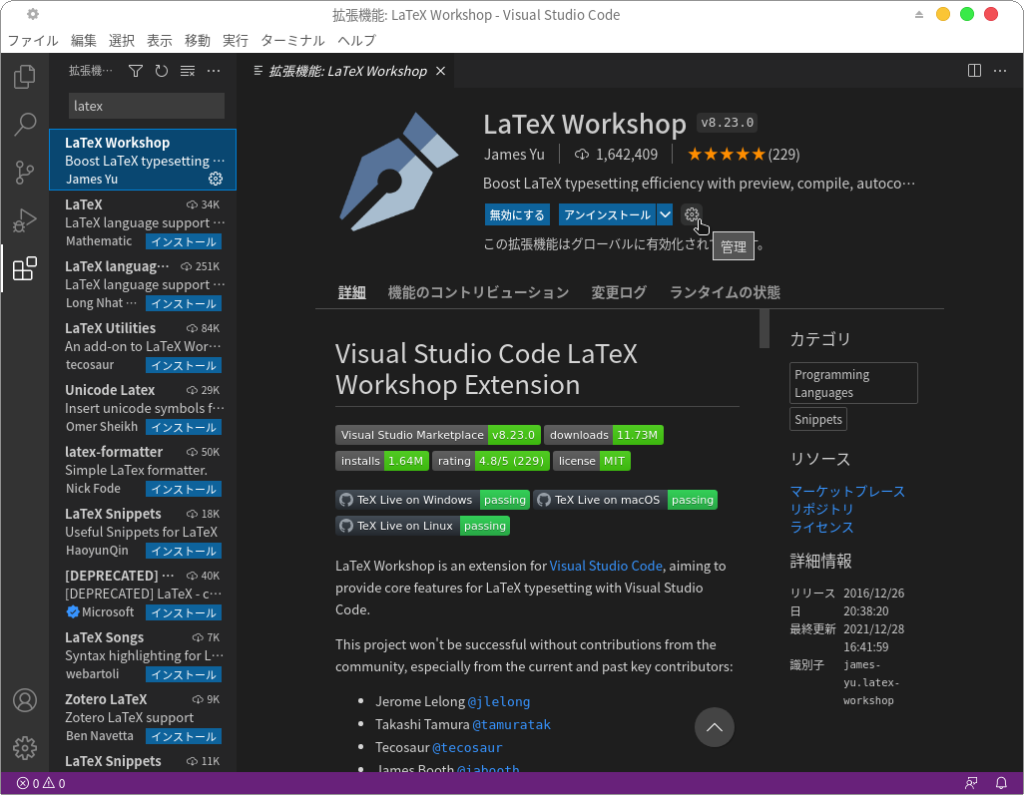
「拡張機能の設定」をクリックします。
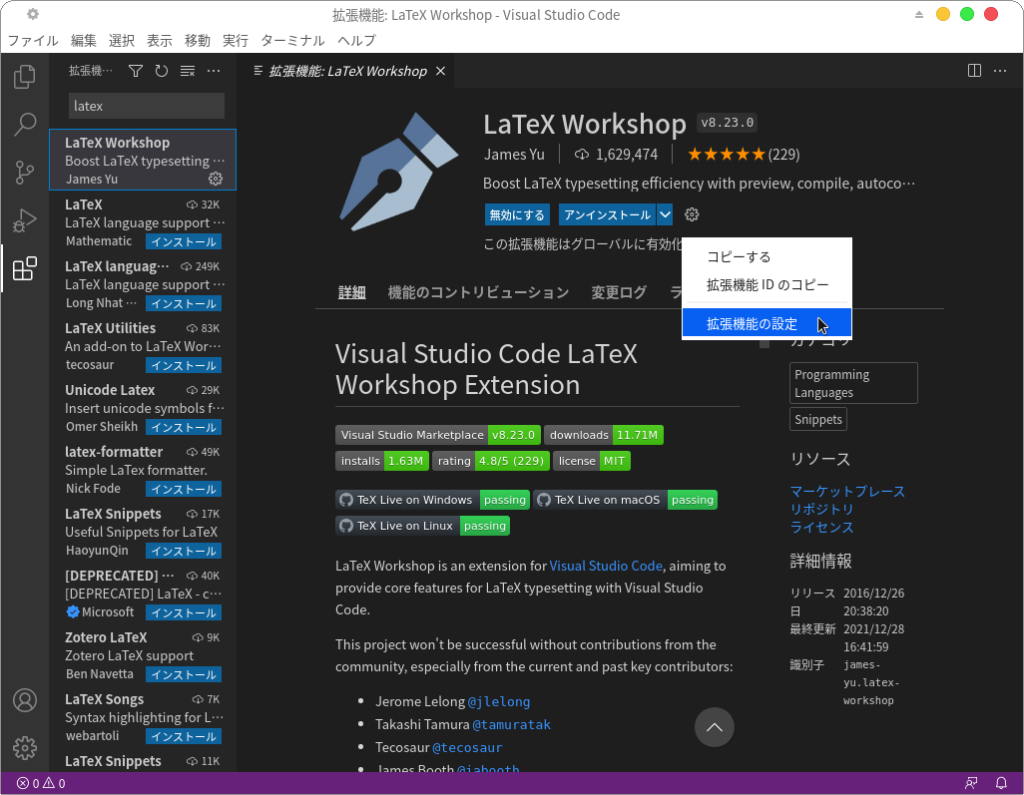
「設定」タブが表示されるので、下の方にスクロールしていき、「Latex-workshop>Latex: Tools」にある「settings.jsonで編集」をクリックします。
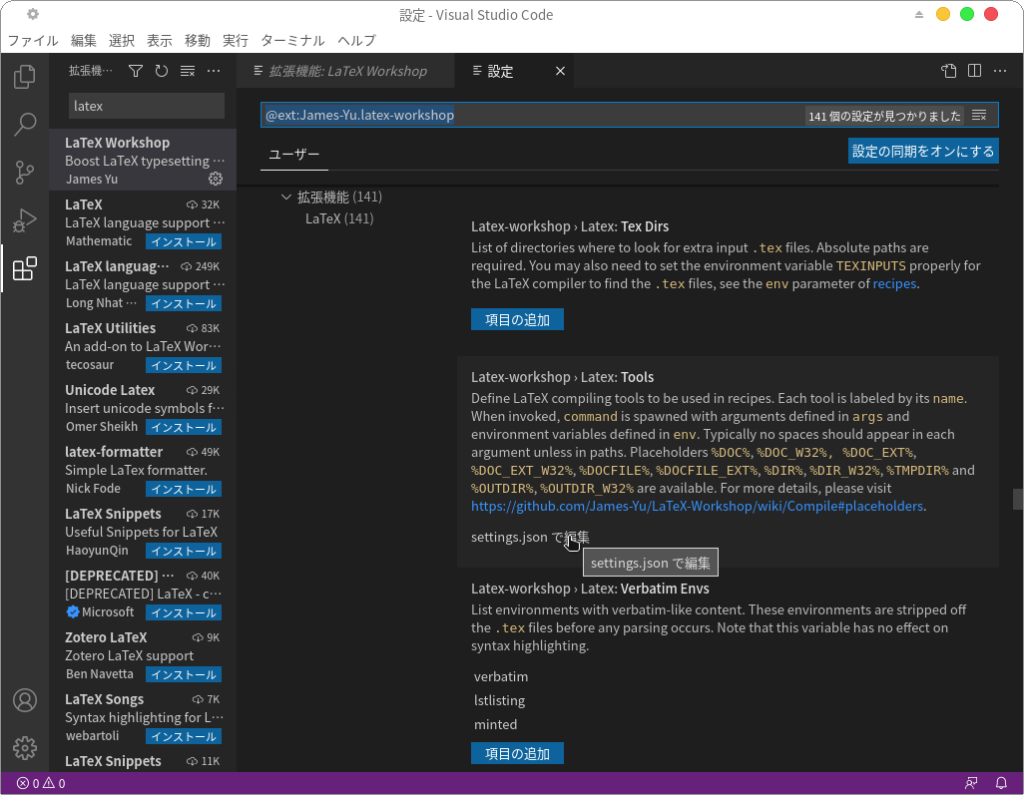
「settings.json」タブが表示されるので、以下の内容を参考にLaTeX Workshopの設定項目を追記してください。
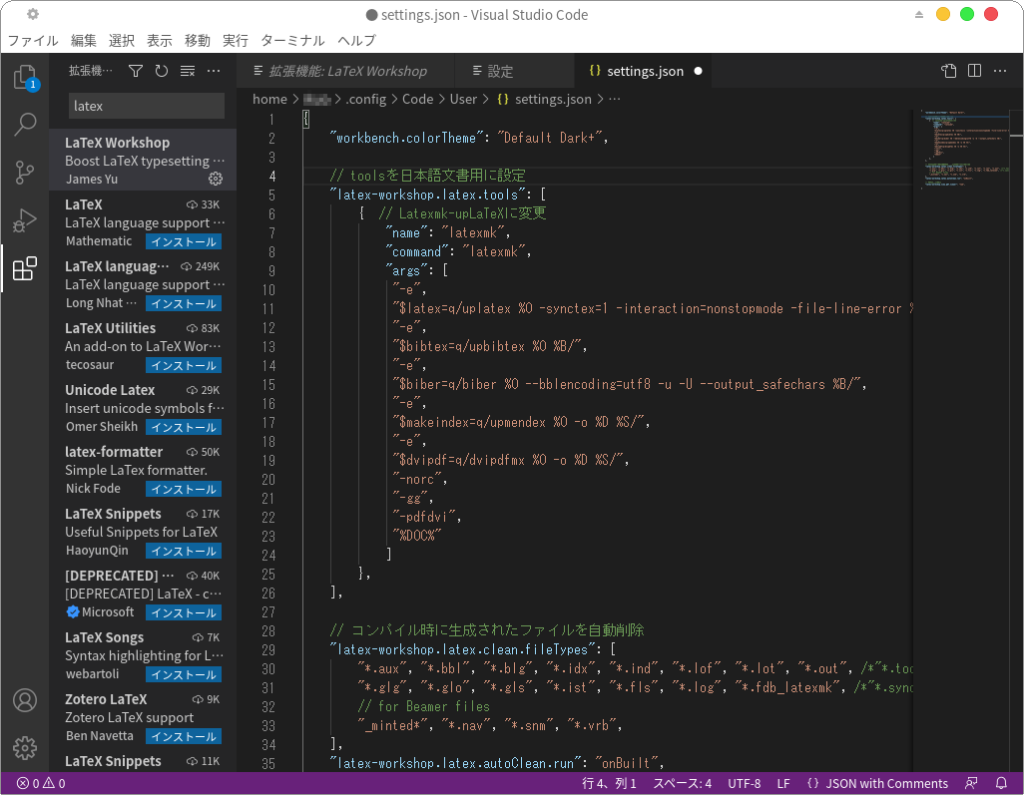
settings.json の変更内容
4行目から38行目までが追記したLaTeX Workshopの設定項目です。
{
    "workbench.colorTheme": "Default Dark+",

    // toolsを日本語文書用に設定
    "latex-workshop.latex.tools": [
        {  // Latexmk-upLaTeXに変更
            "name": "latexmk",
            "command": "latexmk",
            "args": [
             "-e",
             "$latex=q/uplatex %O -synctex=1 -interaction=nonstopmode -file-line-error %S/",
             "-e",
             "$bibtex=q/upbibtex %O %B/",
             "-e",
             "$biber=q/biber %O --bblencoding=utf8 -u -U --output_safechars %B/",
             "-e",
             "$makeindex=q/upmendex %O -o %D %S/",
             "-e",
             "$dvipdf=q/dvipdfmx %O -o %D %S/",
             "-norc",
             "-gg",
             "-pdfdvi",
             "%DOC%"
            ]
        },
    ],

    // コンパイル時に生成されたファイルを自動削除
    "latex-workshop.latex.clean.fileTypes": [
        "*.aux", "*.bbl", "*.blg", "*.idx", "*.ind", "*.lof", "*.lot", "*.out", /*"*.toc",*/ "*.acn", "*.acr", "*.alg",
        "*.glg", "*.glo", "*.gls", "*.ist", "*.fls", "*.log", "*.fdb_latexmk", /*"*.synctex.gz",*/
        // for Beamer files
        "_minted*", "*.nav", "*.snm", "*.vrb",
    ],
    "latex-workshop.latex.autoClean.run": "onBuilt",

    // PDFをタブ表示
    "latex-workshop.view.pdf.viewer": "tab",

}2行目の「"workbench.colorTheme": "Default Dark+",」はLaTeX Workshopの設定とは関係ありませんが、settings.jsonに他の設定項目がある場合は、前の設定項目の最後に必ず「,(半角カンマ)」を付けてください。
修正後はCtrl+Sでsettings.jsonを保存してください。
Visual Studio CodeによるLaTeXファイルのビルド
VSCodeで適当なフォルダを開いて、新規LaTeXファイルを作成します。
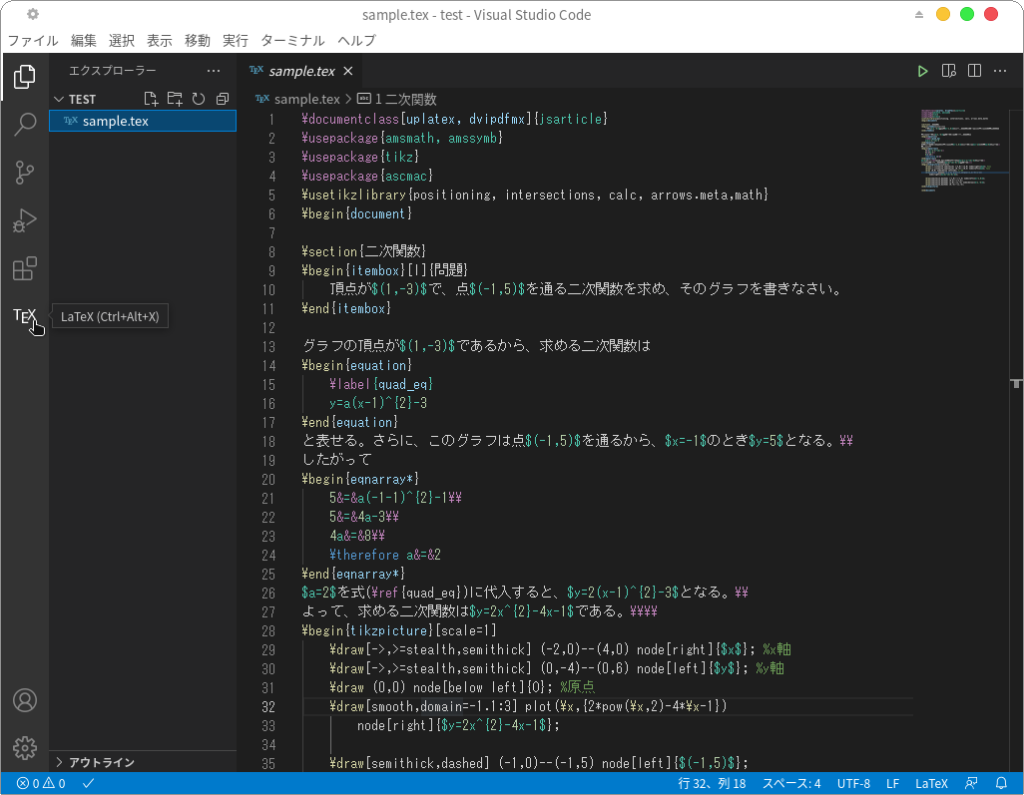
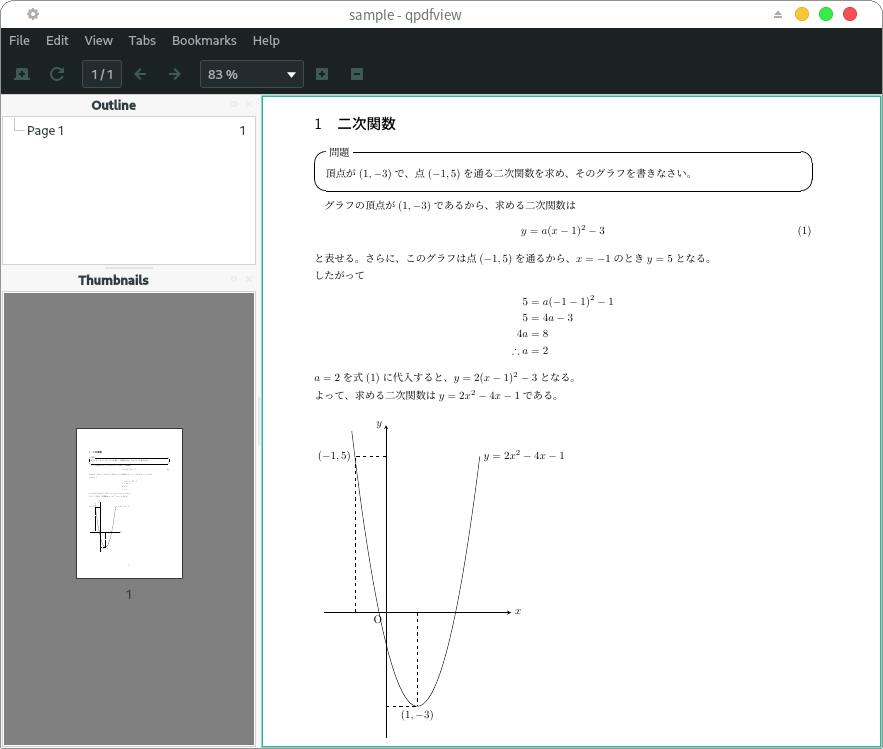
ここではTESTというフォルダに二次関数の数式とグラフを表示するLaTeXファイル(sample.tex)を作成しました。
\documentclass[uplatex, dvipdfmx]{jsarticle}
\usepackage{amsmath, amssymb}
\usepackage{tikz}
\usepackage{ascmac}
\usetikzlibrary{positioning, intersections, calc, arrows.meta,math}
\begin{document}

\section{二次関数}
\begin{itembox}[l]{問題}
    頂点が$(1,-3)$で、点$(-1,5)$を通る二次関数を求め、そのグラフを書きなさい。
\end{itembox}

グラフの頂点が$(1,-3)$であるから、求める二次関数は
\begin{equation}
    \label{quad_eq}
    y=a(x-1)^{2}-3
\end{equation}
と表せる。さらに、このグラフは点$(-1,5)$を通るから、$x=-1$のとき$y=5$となる。\\
したがって
\begin{eqnarray*}
    5&=&a(-1-1)^{2}-1\\
    5&=&4a-3\\
    4a&=&8\\
    \therefore a&=&2
\end{eqnarray*}
$a=2$を式(\ref{quad_eq})に代入すると、$y=2(x-1)^{2}-3$となる。\\
よって、求める二次関数は$y=2x^{2}-4x-1$である。\\\\
\begin{tikzpicture}[scale=1]
    \draw[->,>=stealth,semithick] (-2,0)--(4,0) node[right]{$x$}; %x軸
    \draw[->,>=stealth,semithick] (0,-4)--(0,6) node[left]{$y$}; %y軸
    \draw (0,0) node[below left]{O}; %原点
    \draw[smooth,domain=-1.1:3] plot(\x,{2*pow(\x,2)-4*\x-1})
        node[right]{$y=2x^{2}-4x-1$};

    \draw[semithick,dashed] (-1,0)--(-1,5) node[left]{$(-1,5)$};
    \draw[semithick,dashed] (0,5)--(-1,5);
    \draw[semithick,dashed] (1,0)--(1,-3) node[below]{$(1,-3)$};
    \draw[semithick,dashed] (0,-3)--(1,-3);
\end{tikzpicture}

\end{document}左側にある「機能拡張」アイコンの下にある「\(\TeX\)」アイコンをクリックします。
「COMMANDS」にある「Build LaTeX project」をクリックすると、LaTeXファイルがビルドされてPDFファイルが作成されます。
(または右上にある▷アイコンでもビルドされます)
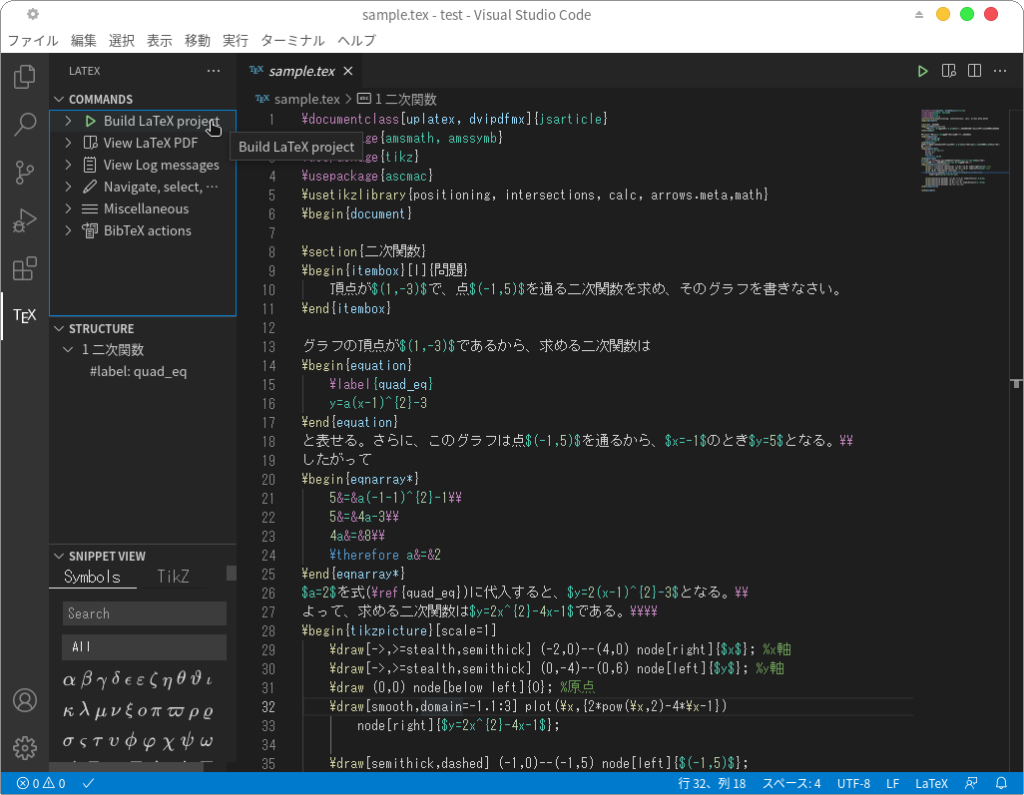
作成されたPDFファイルをVSCode内で確認するには、「COMMANDS」にある「View LaTeX PDF」をクリックします。

タブが開き、作成されたPDFファイルが表示されます。
作成されたPDFファイルをPDFファイルビューアーで確認すると以下のように表示されます。
(ここではPDFビューアーはqpdfviewを使いました)



コメント